Google Home users need smart plugs that respond instantly to voice commands and integrate seamlessly with routines. After testing dozens of options, these three Wi-Fi plugs deliver the best Google Home experience — responsive voice control, reliable connectivity, and easy setup with no hub required.

Kasa KP115 Smart Plug
$19.99
The only plug under $20 with real-time energy monitoring and native Google Home support. Tracks wattage live, sets schedules, and responds instantly to “Hey Google” — no hub needed.

Kasa KP125M (Matter)
$29.99 (2-pack)
Matter-certified plug with energy monitoring that works natively with Google Home, Alexa, Apple Home, and SmartThings. Local control means it keeps working even if the cloud goes down.

Meross Smart Plug Mini (4-Pack)
~$14/ea (4-pack)
Four compact plugs with full Google Home and Alexa support at the lowest per-unit price in this roundup. Bluetooth setup makes pairing effortless — scan a QR code and they’re live in seconds.
Kasa KP115 Smart Plug — Best Overall for Google Home
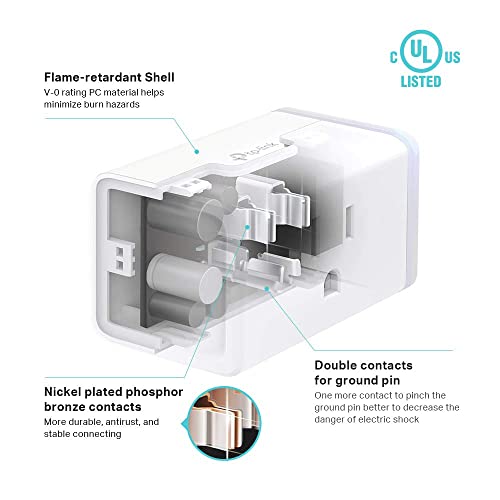
The Kasa KP115 is the gold standard for Google Home users who want energy monitoring at an accessible price. It reports live wattage and daily kilowatt-hours directly in the Kasa app and syncs with Google Home routines — so you can say “Hey Google, good night” and it cuts power to your TV, lamp, and charger in one command.

Pros
- Real-time energy monitoring
- Native Google Home integration
- 15A / 1800W max load
- No hub required
- Responsive voice control
Cons
- 2.4GHz Wi-Fi only
- No Matter support
- Sold as single unit
| ASIN | B08LN3C7WK |
| Max Load | 15A / 1800W |
| Connectivity | 2.4GHz Wi-Fi |
| Voice Assistants | Alexa, Google Home |
| Hub Required | No |
| Matter | No |
| Energy Monitoring | Yes |
Kasa KP125M (Matter) — Best Smart Features
The KP125M is the most future-proof plug in this guide. Matter certification means it integrates with Google Home at the protocol level — faster response, local control, and no cloud dependency. It also adds real-time energy monitoring, making it the only plug here that offers both Matter and wattage tracking under $30 for a 2-pack.


Pros
- Matter certified — works with all ecosystems
- Real-time energy monitoring
- Local control (no cloud dependency)
- Compact design, leaves adjacent outlet free
- 15A max load
Cons
- Requires Thread border router for full Matter benefit
- Pricier than standard Wi-Fi plugs
- App less polished than Kasa’s standard line
| ASIN | B0BYGRLRS1 |
| Max Load | 15A / 1800W |
| Connectivity | 2.4GHz Wi-Fi, Matter |
| Voice Assistants | Alexa, Google Home, Apple Home, SmartThings |
| Hub Required | No |
| Matter | Yes |
| Energy Monitoring | Yes |
Meross Smart Plug Mini (4-Pack) — Best Value
The Meross Smart Plug Mini delivers solid Google Home and Alexa integration at the lowest per-unit cost in this roundup. Bluetooth setup eliminates the app-hunting step — just scan the QR code on the plug and it pairs in seconds. Four plugs let you automate your entire living room without spending more than $60 total.


Pros
- Best per-unit price in 4-pack
- Bluetooth setup — no router gymnastics
- Works with Google Home and Alexa
- Compact mini form factor
- 15A rated
Cons
- No energy monitoring
- No Apple HomeKit support
- App quality below Kasa
| ASIN | B0CGX2V5QQ |
| Max Load | 15A / 1800W |
| Connectivity | 2.4GHz Wi-Fi + Bluetooth |
| Voice Assistants | Alexa, Google Assistant |
| Hub Required | No |
| Matter | No |
| Energy Monitoring | No |
Frequently Asked Questions
Do smart plugs work with Google Home without a hub?
Yes. All three plugs in this guide connect directly to your 2.4GHz Wi-Fi router and integrate with Google Home through the Google Home app — no separate hub, bridge, or smart home controller required. Just link the plug’s app to your Google account.
What is the best smart plug for Google Home in 2026?
The Kasa KP115 is our top pick for most Google Home users: energy monitoring, fast voice response, and reliable connectivity at $19.99. If you want Matter compatibility for future-proofing, the Kasa KP125M is the upgrade pick — it adds local control and cross-ecosystem support.
Can I control smart plugs with Google Assistant voice commands?
Yes. Once linked in the Google Home app, you can say “Hey Google, turn off the lamp” or “Hey Google, turn on the coffee maker.” You can also group plugs into rooms and control entire areas with a single command like “Hey Google, turn off the bedroom.”
Do smart plugs with energy monitoring work with Google Home?
Yes, but energy data is typically viewed in the plug’s native app (Kasa), not in the Google Home app itself. Google Home handles on/off control and routines, while the Kasa app shows wattage, daily usage, and monthly cost estimates in real time.
What is the difference between Matter and Wi-Fi smart plugs for Google Home?
Standard Wi-Fi plugs connect through the cloud — commands go app to cloud to plug. Matter plugs like the KP125M connect locally: Google Home speaks directly to the plug over your local network, resulting in faster response and no cloud outage risk. Matter also lets one plug work natively with Google Home, Alexa, and Apple Home simultaneously.
How do I set up a smart plug with Google Home?
First, set up the plug in its native app (Kasa or Meross) and connect it to your Wi-Fi. Then open the Google Home app, tap the + button, select “Set up device,” choose “Works with Google,” and search for the plug’s brand. Sign in and authorize access — your plugs appear in Google Home within seconds.
Can I use smart plugs with Google Home routines?
Yes. Google Home Routines let you trigger smart plugs automatically based on time, sunrise/sunset, or voice command. A “Good Morning” routine can turn on your coffee maker and lamp at 7am, while a “Good Night” routine can cut power to your TV and all non-essential devices in one tap or voice command.